
📂 Entities
By using entity store, you now have the capability to organize your data based on a predefined schema. This structured data can be accessed during the processor's execution and can also be retrieved using our SQL and GraphQL APIs.
Beginning with version 2.39.6, we have implemented the use of decorators to minimize codegen sizes. Please ensure that your tsconfig.json file has the following configurations enabled:
{
  "experimentalDecorators": true,
  "emitDecoratorMetadata": true
}
Schema
The schema can be established using the GraphQL schema definition language. This schema is specified in the store.graphql file located at the root of the processor directory. The following is an example of a schema definition:
 type Transfer @entity {
    id: ID!
    from: User!
    to: User!
    amount: BigDecimal!
}

type User @entity {
    id: ID!
    name: String!
}
The structure of the schema is made up of entities, interfaces, and enums.
Define Entities
An entity is a type that represents a data structure. The entity is defined using the @entity directive. The entity can have fields that are scalar types or other entities. The entity must have an id field of type ID!.
IDs
Every entity is required to define a field named id with the type of ID!. This id field serves as the primary key and ensures uniqueness across all entities of the same type.
Scalar Types
The scalar types are the basic building blocks of the schema. The scalar types includes:
- Int
- Float
- String
- Boolean
- ID
- BigInt
- BigDecimal
Relationships
Entities can have relationships with other entities. The relationships can be one-to-one, one-to-many, or many-to-many.
One-to-One relationship
In instances where a single entity is linked to another single entity, it's typically referred to as a one-to-one relationship.
For instance, a user is associated with a single corresponding profile, and each profile is linked to one specific user.
type Profile @entity {
    id: ID!
    user: User!
}

type User @entity {
    id: ID!
    profile: Profile
}
One-to-Many relationship
To establish a one-to-many relationship in an entity, you should use square brackets around the field type. This indicates that the field can hold multiple instances of the related entity.
For instance, a company can have multiple employees, but each employee is associated with only one company.
type Company @entity {
    id: ID!
    name: String!
}
type Employee @entity {
    id: ID!
    name: String!
    company: Company!
}
Reverse lookup by derivedFrom
The @derivedFrom directive is used to specify the field in the related entity that the relationship is derived from.
type Company @entity {
    id: ID!
    name: String!
    employees: [Employee!] @derivedFrom(field: "company")
}
type Employee @entity {
    id: ID!
    name: String!
    company: Company!
}
Many-to-Many relationship
To define a many-to-many relationship, you should use square brackets around the field type in both entities.
For instance, a student can enroll in multiple courses, and each course can have multiple students.
type Student @entity {
    id: ID!
    name: String!
    courses: [Course!]! @derivedFrom(field: "students")
}
type Course @entity {
    id: ID!
    name: String!
    students: [Student!]!
}
Index
By default, the id field will be indexed to support fast queries. You can optionally add an index on other fields using the @index annotation, as shown in the example below. Underlying, numbers will be applied with a range index and other types will be applied with a bloomfilter.
type Student @entity {
    id: ID!
    name: String! @index
    courses: [Course!]!
}
Timeseries and Aggregation
Starting from SDK 3.0, Sentio supports timeseries entities and aggregation expressions.
Timeseries Entity
You can mark an entity as a timeseries entity using @entity(timeseries: true). A timeseries entity must have a timestamp field of type Timestamp!.
type EntityH @entity(timeseries: true) {
    id: Int8!
    timestamp: Timestamp!
    dimA: String!
    dimB: EntityI
    propA: BigDecimal!
    propB: BigDecimal!
    propC: BigInt!
}
Aggregation
You can define an aggregation type using @aggregation directive. The source argument specifies the source entity for the aggregation. The intervals argument specifies the time intervals for the aggregation.
Supported aggregation functions in @aggregate directive:
summinmaxcountfirstlast
The arg argument in @aggregate supports basic arithmetic expressions.
type AggA @aggregation(intervals: ["hour", "day"], source: "EntityH") {
    id: Int8!
    timestamp: Timestamp!
    dimA: String!
    aggA: BigDecimal! @aggregate(fn: "sum", arg: "propA")
    aggB: BigDecimal! @aggregate(fn: "max", arg: "(propA+propB)/2")
    aggC: BigDecimal! @aggregate(fn: "sum", arg: "least(propA,propB)")
    aggD: BigInt! @aggregate(fn: "first", arg: "propC")
    aggE: BigInt! @aggregate(fn: "last", arg: "propC")
    aggF: Int8! @aggregate(fn: "count")
}
Interfaces
Interfaces are a type of structure in GraphQL that can be used by entities. They are created using the interface keyword and can contain fields of scalar types or other entities. Entities can implement these interfaces using the implements keyword. They are beneficial for defining fields that are common across multiple entities.
type Project @entity {
    id: ID!
    name: String!
    owner: ProjectOwner!
}
interface ProjectOwner {
    id: ID!
    name: String!
}

type User implements ProjectOwner @entity {
    id: ID!
    name: String!
}

type Organization implements ProjectOwner @entity {
    id: ID!
    name: String!
}
Enums
Enums are a type of structure in GraphQL that can be used to define a set of constants. They are created using the enum keyword and can contain a list of values. Enums are useful for defining fields that have a fixed set of values.
enum Role {
    ADMIN
    USER
}
type User @entity {
    id: ID!
    name: String!
    role: Role!
}
Accessing Data in Processor
After defining the schema, you can use sentio build to generate the TypeScript types for the schema. The generated files is located in the src/schema directory. The following is an example of the generated types:
type UserData = Omit<User, "rewards"> & {rewards?: Array<ID|Reward>}

@entity("User")
export class User extends Entity {
    constructor(data: Partial<UserData>) {
        super(data)
    }
    get id(): ID { return this.get("id") }
    set id(value: ID) { this.set("id", value) }
    get name(): String { return this.get("name") }
    set name(value: String) { this.set("name", value) }
}
The generated types can be used to access the data in the processor. use ctx.store to interact with the data store.
Note: If you have multiple chains involved in your processor, entity stores for different chains are isolated, and you cannot make cross-chain queries with
ctx.store.
Insert or Update Data
To insert or update data in the store, you can use the ctx.store.upsert method. The following is an example of inserting a new user:
import { User } from './schema/schema.js'
ERC20Processor.onEventTransfer(
    async (event, ctx) => {
        const from = new User({
            id: event.args.from
        })

        await ctx.store.upsert(from)
        const to = new User({
            id: event.args.to
        })
        await ctx.store.upsert(to)
    }
)
Partial update
ctx.store.upsert replaces the whole entity. When you only want to change a few fields of an entity that already exists, or when several handlers change the same entity, use update (also available as a static method on every generated entity class). Fields you do not mention keep their latest value, and the update is applied on the server, so no get round trip is needed:
import { User } from './schema/schema.js'
import { add, multiply, expr } from '@sentio/sdk/store'

await User.update({
  id: event.args.from,
  name: 'alice',                 // set
  transfers: add(1),             // transfers = transfers + 1
  score: multiply(0.9),          // score = score * 0.9
  balance: expr('balance - amount'),
  status: expr("if(balance > 0, 'active', 'idle')")
})
An update carries one operation per field:
| Operation | Effect | Field types | When the entity does not exist yet |
|---|---|---|---|
| plain value | replaces the value | any | the value is stored |
add(n) | field = field + n | numeric | the previous value counts as 0 |
multiply(n) | field = field * n | numeric | the previous value counts as 0 |
expr('...') | field = <expression> | any non-list field | field references are null, see below |
An update on an entity that does not exist creates it: id is taken from the update, and the other fields you do not mention get the zero value of their type (0, '', false, null for nullable fields). An update that sets every field with a plain value replaces the whole entity and is treated exactly like an upsert. Updates cannot target list fields or fields declared with @derivedFrom, and they are rejected for immutable entities (@entity(immutable: true) and timeseries entities): an update corrects the previous version, which an immutable entity must not have, so use upsert (or set every field) there.
Expressions
expr('...') sets the field to the result of an expression that the server evaluates against the previous version of the entity, that is, the entity as it was right before this update, including the effect of earlier upsert and update calls in the same block. All expressions of one update call read the same previous version, so their order inside the call does not matter and a field can be computed from the old value of another field that the same call replaces.
Any error in an expression is reported when the update is sent, from the update call in your handler: unknown fields, type mismatches, wrong argument counts and division by a literal zero are all rejected before anything is stored. The only errors that can occur later, when the entity is stored, are a division by a value that turns out to be zero and a null result for a non-null field.
Types. Every value has one of these types, determined from the schema before the expression runs:
| Expression type | Schema field types | Literals |
|---|---|---|
| integer | Int, Int8, BigInt, Timestamp (microseconds) | digits only: 0, 42, -7 |
| number | Float, BigDecimal | with a decimal point or exponent: 1.5, -0.25, 1e18 |
| string | String, ID, Bytes (as 0x… hex), enums, references to other entities (the id) | single quotes: 'abc', 'it\'s' |
| boolean | Boolean | true, false |
| null | — | null |
An integer is accepted wherever a number is; the result of mixing the two is a number. Typing is strict otherwise: strings, numbers and booleans never convert into each other, so 'a' + 1, count and flag, name > 1 or if(count, 1, 2) are rejected. Use toString and concat to build strings from other values.
The result of the expression must match the type of the target field: a number (including the result of /) may be stored into an integer field, in which case it is rounded half away from zero (2.5 becomes 3, -2.5 becomes -3); anything else must be the same type as the field, or null.
Field references. Write the name of the field exactly as declared in the schema (names are case sensitive). Fields with a list type or declared with @derivedFrom cannot be referenced. A field named and, or, not, div, true, false or null cannot be referenced either, those words are operators and literals. Every field reference is null when the entity does not exist yet.
Operators, from the loosest to the tightest binding; use parentheses to override:
| Precedence | Operators | Operands | Result |
|---|---|---|---|
| 1 (loosest) | or | boolean, boolean | boolean |
| 2 | and | boolean, boolean | boolean |
| 3 | not | boolean | boolean |
| 4 | =, != | two values of the same type | boolean |
| 4 | >, >=, <, <= | two numbers or two strings (byte-wise order) | boolean |
| 5 | +, - | numbers | integer when both sides are integers, otherwise number |
| 6 (tightest) | * | numbers | integer when both sides are integers, otherwise number |
| 6 | / | numbers | number (decimal division, never truncated) |
| 6 | div | integers | integer (integer division, truncated toward zero: 7 div 2 is 3, -7 div 2 is -3) |
So not a = b means not (a = b), not a and b means (not a) and b, and a + 1 > b * 2 and c means ((a + 1) > (b * 2)) and c. Operators binding at the same level associate to the left. A unary minus only applies to number literals (-1, -2.5); write 0 - x to negate a field.
Functions. Function names are case insensitive:
| Function | Result |
|---|---|
exist() | true when the entity already has a previous version, false when this update creates it |
isNull(x) | true when x evaluates to null (so isNull(field) is true for a new entity) |
coalesce(a, b, ...) | the first argument that is not null, null when all are; all arguments must have the same type |
if(cond, a, b) | a when cond is true, otherwise b (a null condition counts as false); a and b must have the same type |
concat(a, b, ...) | the strings joined together; every argument must be a string |
toString(x) | the value as a string: numbers in their shortest decimal form (10, 2.5, 1000000000000000), booleans as true / false, strings unchanged |
if and coalesce only evaluate the branches they need, so if(count = 0, 0, total / count) never divides by zero.
Null. Null follows SQL rules:
- a field reference is
nullwhen the entity does not exist yet, or when a nullable field holdsnull; +,-,*,/,div, every comparison,concatandtoStringreturnnullas soon as one operand isnull;andandoruse three-valued logic:false and nullisfalse,true or nullistrue,true and nullandfalse or nullarenull;not nullisnull;iftreats anullcondition asfalse;coalesceskipsnullarguments;isNullandexistnever returnnull;- storing
nullinto a non-null field fails the update, so guard fields that may be written for the first time:
await User.update({
  id,
  balance: expr('coalesce(balance, 0) + amount'),
  updates: expr('if(exist(), updates + 1, 1)'),
  label: expr("concat(coalesce(label, ''), '|', toString(amount))")
})
Only expr sees a missing entity as null; add and multiply keep treating it as 0.
Arithmetic precision. Every numeric type is computed with exact decimal arithmetic regardless of the field type, so BigInt and BigDecimal fields never lose precision inside an expression; Float values are converted from their decimal representation. Division by zero is an error: x / 0 and x div 0 are rejected when the update is sent, x / y with y equal to 0 fails when the entity is stored, and a null divisor yields null instead.
Get entity by ID
To retrieve an entity by its ID, you can use the ctx.store.get method. The following is an example of retrieving a user by its ID:
import { User } from './schema/schema.js'
ERC20Processor.onEventTransfer(
    async (event, ctx) => {
        const from = await ctx.store.get(User, event.args.from)
        const to = await ctx.store.get(User, event.args.to)
    }
)
Delete entity
To delete an entity, you can use the ctx.store.delete method. The following is an example of deleting a user:
import { User } from './schema/schema.js'

const id = event.args.from
await ctx.store.delete(User, id)
Query entities
In your store, there are two methods to query and filter entities: list and listIterator.
store.list(Entity, filters)
store.list(Entity, filters)For simplicity, the list method returns entities based on the Entity and filters parameters.
The following is an example of querying all users with an amount greater than 0:
import { User } from './schema/schema.js'
ERC20Processor.onEventTransfer(
    async (event, ctx) => {
        // Get all users with amount greater than 0
        const users = await ctx.store.list(User, [{field:"amount", op:">", value: 0}])
        for (const user of users) {
            console.log(user)
        }
    }
)
Please be aware that thelist method retrieves all entities, which might not be optimal and could potentially consume a lot of memory resources in your processor. For handling larger datasets, we recommend using the listIterator method.
store.listIterator(Entity, filters)
store.listIterator(Entity, filters)The listIterator method returns an iterator that can be used to iterate over entities based on the Entity and filters parameters.
You can use the for await grammar to iterate over the entities.
ERC20Processor.onEventTransfer(
    async (event, ctx) => {
        for await (const user of ctx.store.listIterator(User, [{field:"name", op:"=", value: "Alice"}])) {
            console.log(user)
        }
    }
)
Unlike the list method, the listIterator method does not load all entities into memory at once,
you can handle entities one by one, or in batches, which is more memory-efficient.
The following is an example of handling entities in batches:
ERC20Processor.onEventTransfer (
    async (event, ctx) => {
        const iterator = ctx.store.listIterator(User, [{field:"name", op:"=", value: "Alice"}])

        let batch: User[] = []
        let promises: Promise<any> = []
        for await (const users of iterator) {
            batch.push(users)
            if (batch.length >= 10) {
                promises.push(handleBatch([...batch]))
                batch = []
            }
            // you can use `break` to stop the iteration
            // if (promises.length > 100) break
        }
        // handle the last batch
        if (batch.length > 0) {
            promises.push(handleBatch([...batch]))
        }
        // wait for all promises to complete
        await Promise.all(promises)
    }
)
Filters
The filters parameter is an array of objects that specify the filter conditions. Each object has the following fields:
-
field: The field name to filter on. -
op: The operator to use for the filter. The supported operators are:=: Equal!=: Not equal>: Greater than>=: Greater than or equal<: Less than<=: Less than or equalin: In the listnot in: Not in the list
-
value: The value or the array of values to filter on.
Multiple filters are combined using the logical AND operator.
The following is an example of querying all users like the where amount > 0 AND name = 'Alice' in SQL:
ctx.store.listIterator(User, [
    {field:"amount", op:">", value: 0},
    {field:"name", op:"=", value: "Alice"}
])
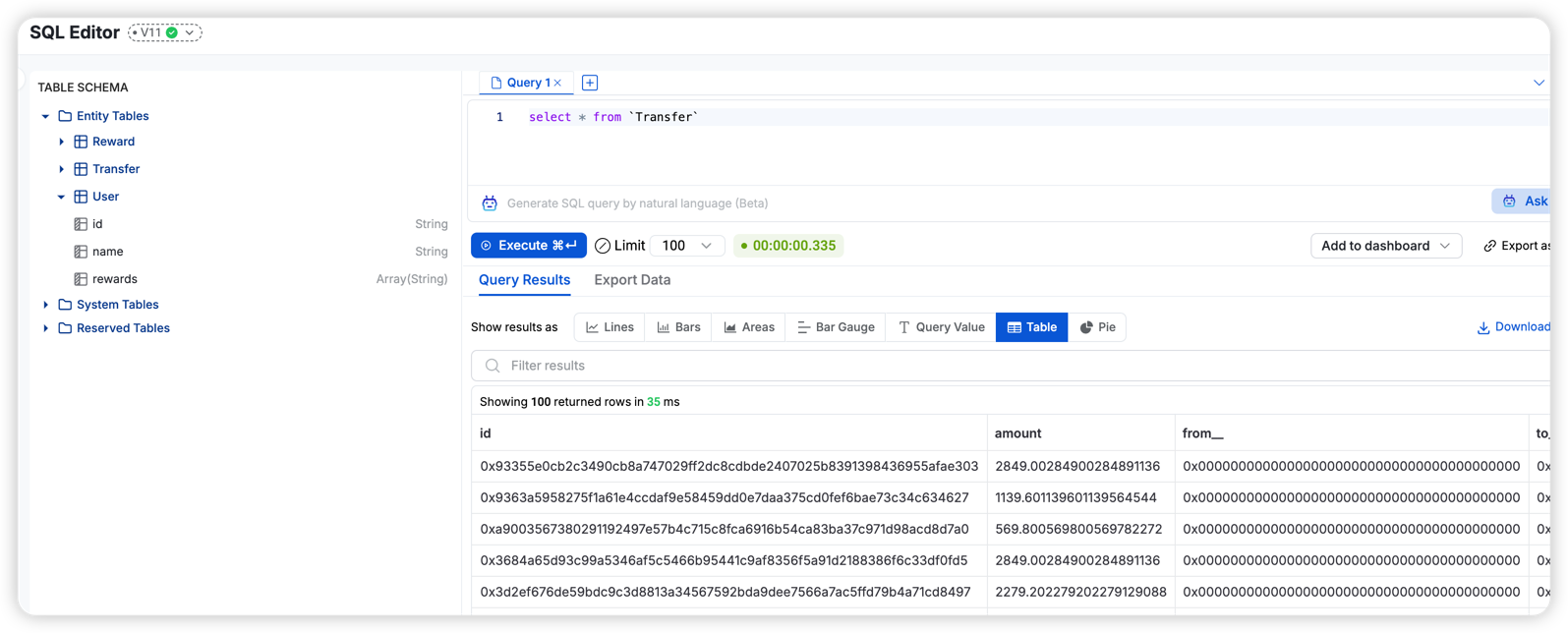
Query Data using SQL
You can query the data store using SQL. Just like you do with event logs data. The entity will show up in table schema.
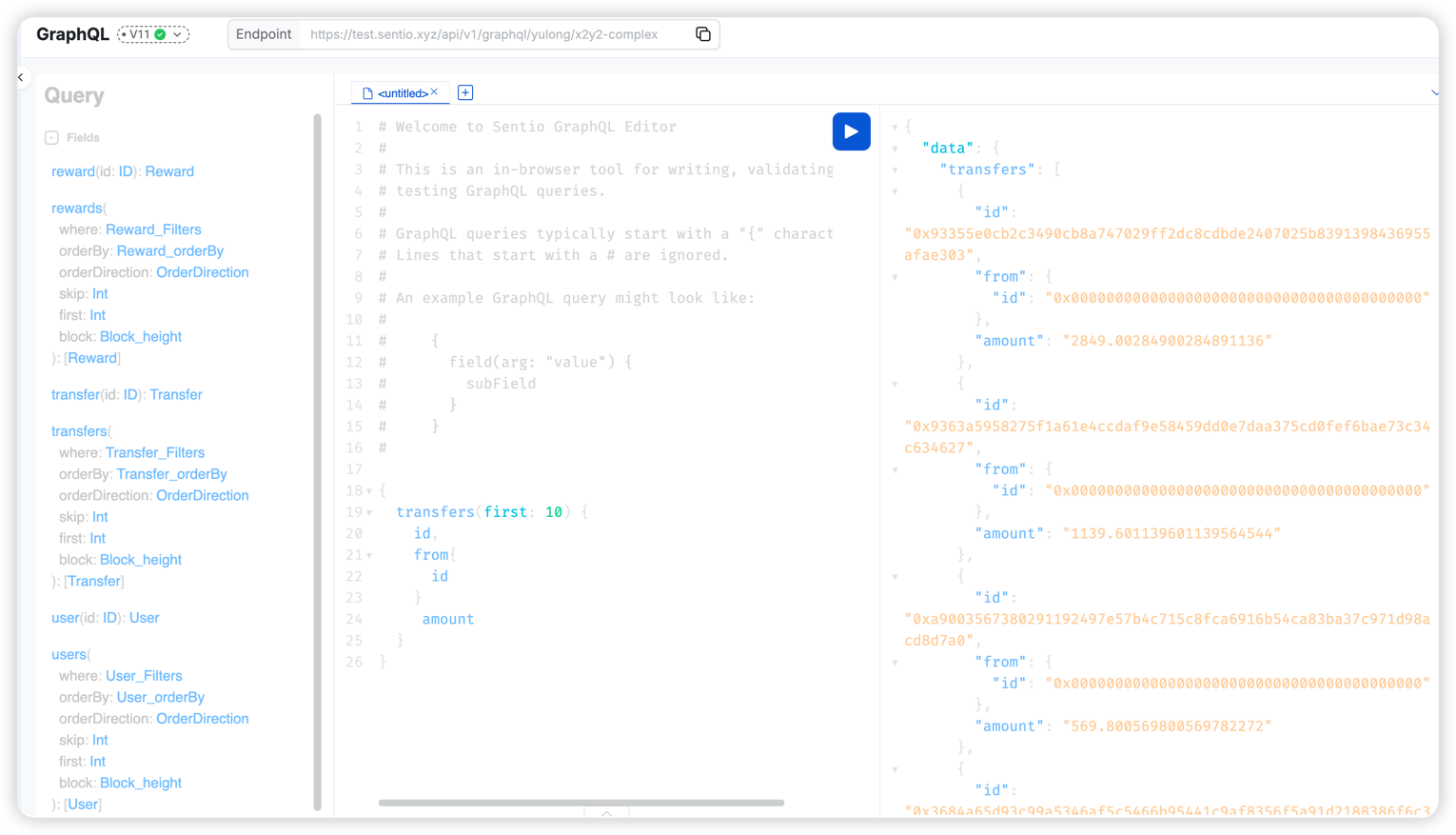
Query Data using GraphQL
You can query the data store using GraphQL. The query schema will be generated based on the schema definition.
Updated 13 days ago